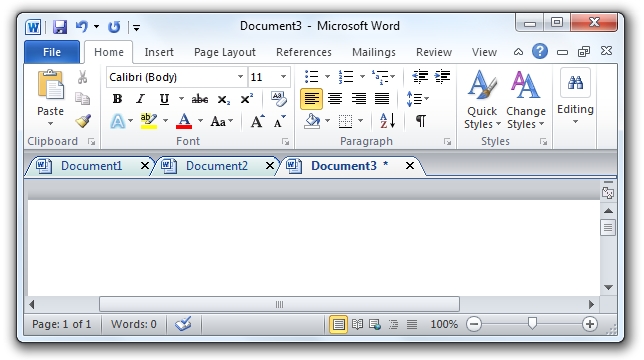
Sebelumnya saya sudah posting Office Tab 6 versi gratis, kali ini sudah tersedia versi 8 dan masih ada versi gratisnya. Jadi Anda tidak perlu mencari serial, crack, dan semacamnya. Sudah tahu kan apa fungsi Office Tab? Benar, fungsinya adalah menambahkan tab pada Microsoft Office (Word, Excel, Power Point). Alat ini sangat memudahkan kita bekerja pada banyak dokumen. Setiap dokumen yang dibuka ada dalam tab sendiri-sendiri bukan jendela
sendiri-sendiri, persis seperti web browser. Jadi, membuka, membaca, mengedit, dan mengatur dokumen-dokumen yang banyak dapat dilakukan dalam satu jendela ber-tab.
Lebih jelas lihat gambar di bawah:
Informasi lengkap dan Download silahkan ke SINI
Showing posts with label Office. Show all posts
Mengetik 10 Halaman dalam Waktu 10 Detik pada Microsoft Word
Mau tahu cara agar kita dapat membuat tulisan sebanyak 10 halaman dalam waktu 10 detik? Sepertinya tidak masuk akal bukan? Hehe..mari bermain-main sejenak bersama Microsoft Word. Caranya sangat mudah. Tidak perlu Copy - Paste atau Cut - Paste, tidak perlu keterampilan mengetik 10 jari, tidak perlu pula keterampilan-keterampilan lainnya. Anda hanya perlu mengetik baris perintah berikut ini pada awal paragraf.
Perintahnya adalah:
=rand() atau =rand(10,10)
atau mengetikkan perintah:
=lorem() atau =lorem(2,3)
Angka dalam kurung adalah jumlah jumlah paragraf dan jumlah kalimat. Jika Anda menulis angka 2 dan 3 dalam kurung maka akan ada 2 paragraf dan setiap paragraf terdiri dari 3 kalimat.
Selamat mencoba :)
Perintahnya adalah:
=rand() atau =rand(10,10)
atau mengetikkan perintah:
=lorem() atau =lorem(2,3)
Angka dalam kurung adalah jumlah jumlah paragraf dan jumlah kalimat. Jika Anda menulis angka 2 dan 3 dalam kurung maka akan ada 2 paragraf dan setiap paragraf terdiri dari 3 kalimat.
Selamat mencoba :)
Simpo PDF Password Remover - Penghapus Password File PDF
Remove PDF User Password
Simpo PDF Password Remover is designed to remove PDF password, including both owner and user password. But, to successfully remove user password to unlock PDF files, you are required to correctly enter user password at first.
Remove PDF restrictions
Many PDF users are customed to set owner password to protect a PDF document from printing, copying and editing, at this time, you can use Simpo PDF Password Remover to remove PDF restrictions (owner password), and then you are in full control of the output PDFs.
Secure and customize output PDFs
Simpo PDF Password Remover can not only remove PDF restrictions of user and owner password, but also allow you to reset password to secure your output PDFs with the stronger 128bit RC4 and AES encryption, in the meanwhile, you could customize Metadata to proclaim the authority of output PDF files.
Decrypt batch PDFs with several formats
This top-notch PDF password remover allows you to import a batch of PDF files and remove PDF password at a time. This batch decryption functionality is helpful to save your time. In addition, Adobe PDF 1.0 - 1.7 formats are supported.
Remove password from PDF by drag-drop function
It's convenient for you to use this drag-and-drop function to import a lot of PDF files and remove password from PDF for them at a time.
Multi-languages Supported
Simpo PDF Password Remover supports multi-languages. Now English, Italian, German, French, Hungarian, Spanish, Traditional Chinese and Simplified Chinese are available!
System Requirement:
Operating System: Windows 7, Vista, XP. Support 32Bit and 64Bit
Download Here
or
Download Here
Simpo PDF Password Remover is designed to remove PDF password, including both owner and user password. But, to successfully remove user password to unlock PDF files, you are required to correctly enter user password at first.
Remove PDF restrictions
Many PDF users are customed to set owner password to protect a PDF document from printing, copying and editing, at this time, you can use Simpo PDF Password Remover to remove PDF restrictions (owner password), and then you are in full control of the output PDFs.
Secure and customize output PDFs
Simpo PDF Password Remover can not only remove PDF restrictions of user and owner password, but also allow you to reset password to secure your output PDFs with the stronger 128bit RC4 and AES encryption, in the meanwhile, you could customize Metadata to proclaim the authority of output PDF files.
Decrypt batch PDFs with several formats
This top-notch PDF password remover allows you to import a batch of PDF files and remove PDF password at a time. This batch decryption functionality is helpful to save your time. In addition, Adobe PDF 1.0 - 1.7 formats are supported.
Remove password from PDF by drag-drop function
It's convenient for you to use this drag-and-drop function to import a lot of PDF files and remove password from PDF for them at a time.
Multi-languages Supported
Simpo PDF Password Remover supports multi-languages. Now English, Italian, German, French, Hungarian, Spanish, Traditional Chinese and Simplified Chinese are available!
System Requirement:
Operating System: Windows 7, Vista, XP. Support 32Bit and 64Bit
Download Here
or
Download Here
Wondershare PDF to Word Converter Free 3.0.0
Diperlukan software khusus jika kita ingin mengubah file PDF ke Word. Salah satunya yang bagus adalah Wondershare PDF to Word Converter Free. Software sejenis ini biasanya berbayar sehingga anda harus membelinya untuk dapat menggunakannya secara penuh, atau mungkin anda akan mencari keygen atau cracknya :)
Wondershare PDF to Word Converter Free adalah gratis, jadi anda bebas menggunaknnya. Adapun fitur yang dimiliki software ini adalah sebagai berikut:
Melihat fitur di atas, software gratis ini sudah lebih dari cukup jadi silahkan download DI SINI size 6,2MB.
Requirements: Windows 7 32bit/2003/XP/Vista.
Wondershare PDF to Word Converter Free adalah gratis, jadi anda bebas menggunaknnya. Adapun fitur yang dimiliki software ini adalah sebagai berikut:
- Konversi PDF menjadi Word yang cukup akurat, dengan mempertahankan layout, gambar, grafik, hyperlink (link) dan format yang ada.
- Hasil keluaran (output) bukan Text Box, sehingga mempermudah jika kita ingin mengeditnya.
- Mendukung Microsoft Office Word 2003/2007/2010.
- Konversi PDF yang di enkripsi (password harus dibuka dulu).
- Konversi banyak dokumen PDF sekaligus, sampai 200 dokumen.
- Konversi hanya halaman tertentu saja, PDF ke word.
- Menyediakan menu konversi dengan klik kanan dokumen PDF.
- Konversi dokumen PDf yang relatif cepat.
Melihat fitur di atas, software gratis ini sudah lebih dari cukup jadi silahkan download DI SINI size 6,2MB.
Requirements: Windows 7 32bit/2003/XP/Vista.
Cara Uninstall Office 2003, 2007, atau 2010 menggunakan Microsoft Fixit
Jika anda tidak dapat mengunistall Office dari komputer melalui control panel gunakan saja Microsoft Fixit berikut ini:
Microsoft Fixit untuk Office 2003
Microsoft Fixit untuk Office 2007
Microsoft Fixit untuk Office 2010
Nah, dengan menggunakan tools tersebut, kita dapat membuang Office secara keseluruhan atau perbagiannya saja. Misalnya kita membuang Office Publisher saja maka yang lainnya tidak akan terganggu.
Microsoft Fixit untuk Office 2003
Microsoft Fixit untuk Office 2007
Microsoft Fixit untuk Office 2010
Nah, dengan menggunakan tools tersebut, kita dapat membuang Office secara keseluruhan atau perbagiannya saja. Misalnya kita membuang Office Publisher saja maka yang lainnya tidak akan terganggu.
Foxit Reader 5.0.2.0718 - The Best PDF Reader
Ada banyak aplikasi yang dapat kita gunakan untuk membaca file PDF, tentu anda sudah familiar dengan Adobe Reader bukan? Sama dengan Adobe, Foxit Reader juga adalah aplikasi untuk membaca file PDF. Tetapi Foxit lebih baik dari sisi performa, keamanan, dan kebutuhan ruang harddisk, itu artinya Foxit lebih baik dari Adobe.
Overview
Overview
The Best PDF Reader – Over 100 Million Users
Whether you're a consumer, business, government agency, or educational organization, you need to read and annotate PDF documents and fill out PDF forms. You need your PDF Reader to be:
- Fast - so you're not waiting forever to read files.
- Lightweight - so it's easily deployable and doesn't exhaust system resources.
- Secure - so you don't get infected with viruses and can keep sensitive information safe.
- A Platform - so you can extend the Reader by creating your own value added capabilities for internal use or for resale.
The Foxit Reader is a small, fast, and feature rich PDF viewer which allows you to open, view, and print any PDF file. Unlike other free PDF readers, Foxit Reader also includes easy to use collaboration features like the ability to add annotations, fill out forms, and add text to PDF documents. Foxit Reader has a small footprint that starts up instantly, renders PDF files quickly and uses very little memory, which is especially important with today's handheld devices. The Foxit Reader is packed full of convenient and easy to use viewing, editing and printing features that make document collaboration simple. Foxit Reader's secure platform insures worry free operation against malicious virus and provides a secure and reliable digital signature verification platform for exchanging electronics documents without putting the user at risk from falsified documents.
System Requirements
Operating Systems
- Microsoft Windows® XP Home, Professional, or Tablet PC Edition with Service Pack 2 or 3 (32-bit & 64-bit).
- Windows Vista® Home Basic, Home Premium, Business, Ultimate, or Enterprise with or without Service Pack 1 (32-bit & 64-bit).
- Windows 7 (32-bit & 64-bit).
Recommended Minimum Hardware for Better Performance
- 1.3 GHz or faster processor.
- 64 MB RAM (Recommended: 128 MB RAM or greater).
- 52 MB of available hard drive space.
- 800x600 screen resolution.
Able2DOC 6.0 - Convert PDF to Word
Fast, Accurate PDF to Word Conversions
Able2Doc 6.0 performs fast and accurate conversions to MS Word and Open Office Writer with columns, tables, headers, footers, graphics and layout reproduced just as they were in the original document. Maximum editability is ensured!
Step 1Giveaway Page

If you dont have Facebook account, you can can download directly from MediaFire
Able2Doc 6.0 performs fast and accurate conversions to MS Word and Open Office Writer with columns, tables, headers, footers, graphics and layout reproduced just as they were in the original document. Maximum editability is ensured!
Step 1Giveaway Page
If you dont have Facebook account, you can can download directly from MediaFire
Shortcut Microsoft Word Office 2010
Selain klik "sana-sini" menggunakan mouse, bekerja menggunakan Word Office bisa lebih mudah dengan adanya shortcut. Shortcut yang dimaksud adalah menekan dua atau lebih tombol pada keyboard secara bersamaan. Misalnya, Ctrl + P berarti menekan tombol "CTRL" dan "P" pada keyboard secara bersamaan, atau boleh juga menekan tombol "CTRL" terlebih dahulu kemudian menekan tombol "P" tanpa melepas tombol "CTRL".
Jika Anda punya shortcut yang tidak ada dalam daftar di atas, mohon beritahu kami pada kotak komentar.
Ctrl+A (Select All) = Mengeblok seluruh isi yang ada dalam suatu lembar kerjaSemoga Bermanfaat!
Ctrl+B (Bold) = Menebalkan huruf
Ctrl+C (Copy) = Menggandakan/meng-copy
Ctrl+D = Membuka kotak dialog pengaturan font
Ctrl+E (Center) = Mengubah posisi teks menjadi di tengah
Ctrl+F (Find) = Melakukan pencarian sebuah kata dalam suatu dokumen
Ctrl+G (Go to) = Pergi ke halaman ataupun baris, dll pada suatu dokumen
Ctrl+H (Replace) = Mengganti sebuah kata dengan kata lain secara otomatis
Ctrl+I (Italic) = Mencetak huruf supaya miring
Ctrl+J (Justify) = Mengubah posisi teks menjadi rata kanan kiri
Ctrl+K (Hyperlink) = Membuat link/hubungan dengan bookmark yang telah dibuat
Ctrl+L (Left) = Mengubah posisi teks menjadi rata kiri
Ctrl+M = Memiliki fungsi yang sama dengan tombol “tab”
Ctrl+N (New) = Membuka lembar kerja baru
Ctrl+O (Open) = Membuka direktori ataupun file yang ada di computer
Ctrl+P (Print) = Untuk mencetak dokumen
Ctrl+Q = Mengubah ukuran “after spacing” pada pengaturan paragraf
Ctrl+R (Right) = Mengubah posisi teks menjadi rata kanan
Ctrl+S (Save) = Menyimpan dokumen namun masih menggunakan nama yang sama
Ctrl+T = Menggeser “Hanging Indent” pada pengaturan tab
Ctrl+U (Underline) = Memberi garis bawah pada teks
Ctrl+V (Paste) = Meletakkan (menempelkan) hasil copy-an yang telah dilakukan sebelumnya
Ctrl+W (Close) = Keluar dari dokumen yang sedang kita kerjakan, namun tidak keluar dari Microsoft Word
Ctrl+X (Cut) = Memotong sebuah teks ataupun gambar
Ctrl+Y (Redo) = Mengembalikan posisi/keadaan lembar kerja tersebut sebelum di-undo
Ctrl+Z (Undo) = Mengembalikan posisi/keadaan lembar kerja ke keadaan sebelumnya
Ctrl+1 = Mengubah jarak antar baris (line spacing) menjadi 1,0 (single)
Ctrl+2 = Mengubah jarak antar baris (line spacing) menjadi 2,0 (double)
Ctrl+5 = Mengubah jarak antar baris (line spacing) menjadi 1,5 lines
Ctrl+0 = Mengubah jarak antar sebelum paragraf (before spacing) menjadi 12 Pt
Ctrl+] = Membesarkan ukuran huruf
Ctrl+[ = Mengecilkan ukuran huruf
Ctrl+del = menghapus kata didepan cursor (Akan terhapus perkata bukan perhuruf)
Ctrl+backspace = menghapus kata dibelakang cursor (Akan terhapus perkata bukan perhuruf)
Ctrl+left = Menggeser cursor perkata ke arah kiri (cursor akan berpindah perkata bukan perhuruf)
Ctrl+right = Menggeser cursor perkata ke arah kanan (cursor akan berpindah perkata bukan perhuruf)
Ctrl+top = Menggeser cursor perparagraf ke atas (cursor akan berpindah perparagraf bukan perkata maupun perhuruf)
Ctrl+bottom = Menggeser cursor perparagraf ke bawah (cursor akan berpindah perparagraf bukan perkata maupun perhuruf)
Shift+left = Mengeblok teks ke kiri perhuruf
Shift+right = Mengeblok teks ke kanan perhuruf
Shift+top = Mengeblok teks ke atas (perbaris)
Shift+bottom = Mengeblok tekas ke bawah (perbaris)
Ctrl+ Shift+left = Mengeblok teks ke kiri perkata
Ctrl+ Shift+right = Mengeblok teks ke kanan perkata
Ctrl+ Shift+top = Mengeblok teks ke atas perparagraf
Ctrl+ Shift+bottom = Mengeblok teks ke bawah perparagraf
Jika Anda punya shortcut yang tidak ada dalam daftar di atas, mohon beritahu kami pada kotak komentar.
Office Tab v6.51 untuk Microsoft Office 2010, 2007, 2003
Jika kita membuka beberapa file word, maka setiap file akan terbuka pada jendela atau window yang berbeda. Bandingkan dengan browser atau peramban Firefox atau Opera misalnya, kita dapat membuka beberapa halaman web dalam satu window tapi dalam beberapa tab. Nah, jika kita menginginkan beberapa file word yang terbuka seperti pada peramban tadi maka kita perlu memasang add on Office Tab namanya.
Untuk lebih jelasnya lihat screenshot berikut ini:
Version: 6.51
FileSize: 2.5MB
Office: Microsoft Office 2010, 2007, 2003
System: Windows7 / Windows Vista / Windows XP
The software is fully free for home use (personal non-commercial use). It works with all editions of MS Office 2010, 2007 and 2003: Enterprise, Ultimate, Professional Plus, Professional, Standard, Home and Business (Small Business), Home and Student...
DOWNLOAD
http://office-tabs.com/download.htm
Untuk lebih jelasnya lihat screenshot berikut ini:
Version: 6.51
FileSize: 2.5MB
Office: Microsoft Office 2010, 2007, 2003
System: Windows7 / Windows Vista / Windows XP
The software is fully free for home use (personal non-commercial use). It works with all editions of MS Office 2010, 2007 and 2003: Enterprise, Ultimate, Professional Plus, Professional, Standard, Home and Business (Small Business), Home and Student...
DOWNLOAD
http://office-tabs.com/download.htm
Balabolka Mengubah Teks Menjadi File Audio
Balabolka is a Text-To-Speech (TTS) program. All computer voices installed on your system are available to Balabolka. The on-screen text can be saved as a WAV, MP3, MP4, OGG or WMA file. The program can read the clipboard content, view the text from CHM, DjVu, DOC, EPUB, FB2, HTML, ODT, PDF and RTF files, customize font and background colour, control reading from the system tray or by the global hotkeys.
The program uses various versions of Microsoft Speech API (SAPI); it allows to alter a voice's parameters, including rate and pitch. The user can apply a special substitution list to improve the quality of the voice's articulation. This feature is useful when you want to change the spelling of words. The rules for the pronunciation correction use the syntax of regular expressions.
Balabolka can save the synchronized text in external LRC files or in MP3 tags inside the audio files. When an audio file is played with players on a computer or on modern digital audio players, the text is displayed synchronously (at the same way, as lyrics for songs).
DOWNLOAD Balabolka Size: 6688 KB
Version: 2.2.0.502
Licence: Freeware
Operating System: Microsoft Windows 2000/XP/2003/Vista/7
Language: English, Arabic, Bulgarian, Chinese (Simplified), Chinese (Traditional), Czech, Dutch, French, German, Hungarian, Italian, Korean, Polish, Portuguese (Brazil), Portuguese (Portugal), Romanian, Russian, Spanish, Ukrainian, Vietnamese
Portable Version Size 6438 KB
The program uses various versions of Microsoft Speech API (SAPI); it allows to alter a voice's parameters, including rate and pitch. The user can apply a special substitution list to improve the quality of the voice's articulation. This feature is useful when you want to change the spelling of words. The rules for the pronunciation correction use the syntax of regular expressions.
Balabolka can save the synchronized text in external LRC files or in MP3 tags inside the audio files. When an audio file is played with players on a computer or on modern digital audio players, the text is displayed synchronously (at the same way, as lyrics for songs).
DOWNLOAD Balabolka Size: 6688 KB
Version: 2.2.0.502
Licence: Freeware
Operating System: Microsoft Windows 2000/XP/2003/Vista/7
Language: English, Arabic, Bulgarian, Chinese (Simplified), Chinese (Traditional), Czech, Dutch, French, German, Hungarian, Italian, Korean, Polish, Portuguese (Brazil), Portuguese (Portugal), Romanian, Russian, Spanish, Ukrainian, Vietnamese
Portable Version Size 6438 KB
Adept PDF to Excel Converter
Adept PDF to Excel Converter adalah converter praktis yang dapat membantu anda mengkonversi file PDF ke file Excel. Data dan layout tetap tidak berubah setelah konversi. Jadi anda dapat dengan mudah melakukan perhitungan, mengatur ulang sheet, dan mengubah datanya.
Adept PDF to Excel Converter adalah program yang berdiri sendiri dan tidak
membutuhkan Microsoft Excel, Adobe Acrobat, bahkan Acrobat Reader dalam menjalankan fungsinya.
atau
http://www.mediafire.com/?uk6ahawgcmjsabo
Gunakan serial ini untuk registrasi Q5NS2-XMRPV-P3F7C-G2VGK
Adept PDF to Excel Converter adalah program yang berdiri sendiri dan tidak
membutuhkan Microsoft Excel, Adobe Acrobat, bahkan Acrobat Reader dalam menjalankan fungsinya.
Key Features
- Convert PDF files into Microsoft Excel documents.
- Standalone software, MS Excel, Adobe Acrobat and Reader NOT required!
- Support Recognizes PDF tables.
- Casts PDF data to the most appropriate MS Excel type.
- Support conversion from encrypted PDF files and password protected documents (Automatically).
- Accurately preserve text, pictures, and layout of the original PDF.
- Support page range conversion (all, from-to, individual pages).
- Support deletion of graphics and pictures from the generated Excel document.
- Support multiple documents conversion (Batch Processing).
- Support drag and drop PDF files for conversion.
- Support PDF1.8 file format (formerly supported only by Adobe Acrobat 9.0).
- Support Windows 98, ME, NT, 2000, XP, 2003, Windows Vista and Windows 7.
- Full install / uninstall support.
atau
http://www.mediafire.com/?uk6ahawgcmjsabo
Gunakan serial ini untuk registrasi Q5NS2-XMRPV-P3F7C-G2VGK
Download eBook Microsoft Office 2010 Tips and Tricks
Anda tentu sudah familiar dengan program pengolah kata yang sangat terkenal ini, ya Microsoft Office. Apakah anda baru bermigrasi dari office 2007 ke 2010? Jika ya mungkin anda membutuhkan ebook Microsoft Office 2010 Tips and Tricks yang dapat di download melalui link berikut:
Mediafire size 1,74 MB (PDF)
eBook tersebut berisi:
- Cara mengedit/menambah video di power point.
- Mempublikasikan presentasi power point ke internet, dll.
Mediafire size 1,74 MB (PDF)
eBook tersebut berisi:
- Cara mengedit/menambah video di power point.
- Mempublikasikan presentasi power point ke internet, dll.
Subscribe to:
Posts (Atom)


